I added a looped water supply pipe network modeling application to my FLOSS (GPL = totally unchained to say "I love you") suite of online engineering calculators that allow multiple units selections and serve multiple languages (recently expanded to 26 for coverage focus in the developing world). It includes a "use EPANET solver" option. Here are some introductory walk-throughs for new shoppers, new users, and new projects. I also put it up at LibreWaterNet.org in hopes of starting a foundation or donating it and my time to an existing org like Open Water Foundation.
Showing posts with label programming. Show all posts
Showing posts with label programming. Show all posts
Monday, August 10, 2026


Saturday, February 19, 2022
AutoLISP Tutorial for AutoCAD Users: Lesson 4
We need a way to fully and permanently integrate our programs into our AutoCAD working environment. AutoCAD provides several ways. This lesson shows you how to make a well-documented system that can grow with you.
Monday, May 25, 2020
Fast AutoCAD project custom text linetypes on the fly
A simple instantaneous linetype reloading system is a huge relief when you want AutoCAD custom text complex linetypes that say things like 400mm W or 1 1/2" GAS (PE). Here is a system that disrupts you minimally so you can get back to your project design.
Friday, March 6, 2020
Creating custom menu button icon image with transparency for AutoCAD Dark and Light themes
I am building this out into a detailed guide to creating a custom menu icon with transparency for AutoCAD Light and Dark themes. The guide begins assuming you have everything (the easiest case) and drills down step by step in case you don't have anything (the arduous case). I provide sample files, and I recommend you verify you can do each step before going to the next one. Please leave questions or comments (including section rewrites) as needed; I'd love to hear which software and method you used to create images and DLL files.
Monday, September 9, 2019
Windows batch file to map virtual drive letter with prompts and conditional branching
I created this batch file for NPS Maricopa Inc. to help colleagues map their local Dropbox root to a standard drive letter. This was necessary because AutoCAD Civil 3D data shortcuts do not use relative paths.
Wednesday, May 9, 2018
How I helped myself screen spam registrations at my PHPBB forum
I get a lot of spam registrations at my PHPBB forum. So I asked new users to tell a little about themselves like this:
1.
In Administration Control Panel, Users and Groups, Custom profile fields, I added an "about" field asking new registrants to tell about themselves. It looks like this on the registration page.

2.
In this file
includes/ucp/ucp_register.php
I added a line for ABOUT here:
I added a message to myself using the ABOUT template variable like this:
1.
In Administration Control Panel, Users and Groups, Custom profile fields, I added an "about" field asking new registrants to tell about themselves. It looks like this on the registration page.
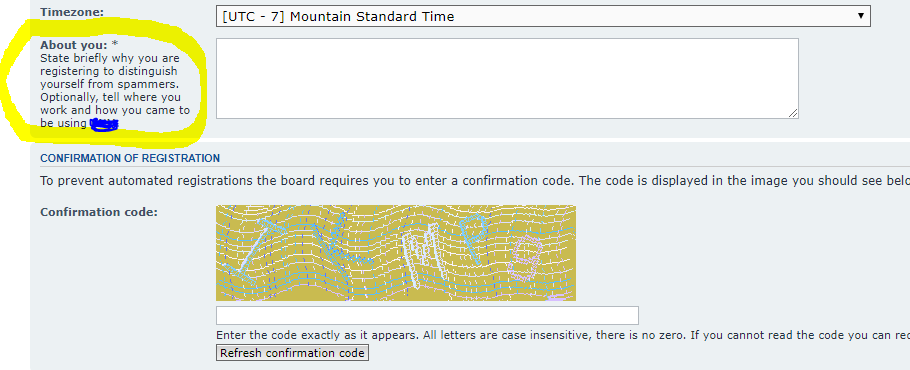
2.
In this file
includes/ucp/ucp_register.php
I added a line for ABOUT here:
 $messenger->assign_vars(array(
  'ABOUT'  => request_var('pf_about', ''),
  'USERNAME'   => htmlspecialchars_decode($data['username']),
  'U_USER_DETAILS' => "$server_url/memberlist.$phpEx?mode=viewprofile&u=$user_id",
  'U_ACTIVATE'  => "$server_url/ucp.$phpEx?mode=activate&u=$user_id&k=$user_actkey")
 );
3.
In this file
language/en/email/admin_activate.txtI added a message to myself using the ABOUT template variable like this:
Subject: Activate user account
{ABOUT}
is what {USERNAME} just said about themself upon registering at the CNM Forum
That's all. Now those spam registrations take me only a second to triage and delete. Robots aren't that smart yet!
Sunday, March 5, 2017
Automated AutoCAD GIS export to Maricopa County DDMSW hydrology
I have finished the first version of the open source work-flow optimized application at AutoCAD Wiki. It works like this:
Sunday, December 28, 2014
AutoLISP Tutorial for AutoCAD Users: Lesson 3
It's not all that comforting to know how to define a custom command
if you can't save it and use it tomorrow or next year. Let's save our
work.
AutoLISP Tutorial for AutoCAD Users: Lesson 2
"Hello, world" is very nice. But what you really wanted to do was write a custom AutoCAD command. So let's do that.
AutoLISP Tutorial for AutoCAD Users: Lesson 1
You are at home in AutoCAD, and you would like to harness the power of AutoLISP. What a perfect fit! Make yourself at home.
Saturday, September 6, 2014
You Can't Put Snow In a Database Table -- How to Name And Think About Database Tables
I blogged previously about the considerations involved in choosing between singular and plural database table names. In the course of getting input on the considerations involved, I came across a concession saying that a "news" table would always be plural. But this post explains why you can't put snow, sunshine, love, mud, furniture, a survey, or news in a database table.
DB Table Name Plural or Singular? How To Choose
A common question for web programmers is whether to give database table names singular or plural names. Since the intuitive preference for one or the other is largely a religious debate, in this post I help you compare the two across many use cases you might not otherwise consider. Then I let you decide which works better over the long haul.
Friday, August 22, 2014
Percona mysql 5.6 for Ubuntu 14.04 Trusty Tahr
It looks like Percona has now released mysql 5.6 for Ubuntu 14.04 Trusty Tahr. I will be verifying and upgrading my Ubuntu to 14.04 if this is correct. I will report back in this post for confirmation.
Tuesday, June 10, 2014
Notes about using the UPS Shipping API with PHP
I am working through integrating the UPS API on a client's system. For my own benefit and the benefit of others, here are some notes:
Tuesday, August 13, 2013
Add a JQuery DatePicker and limit it to show only the dates you specify
I needed to help users avoid mistakes by limiting the dates available to them in the calendar that appears when the JQuery datepicker is used. Here's what I did.
Tuesday, January 15, 2013
Beginning AutoLISP programming for AutoCAD users
A fellow AutoCAD user friend of mine asked me yesterday if I knew a good place to learn the basics of how to program using LISP (in our world, that's short for AutoLISP).
Sunday, June 17, 2012
How to choose which language to show a web site visitor
How are we supposed to automatically decide which language at our site to show a visitor? The HTTP/1.1 14.4 Accept-Language spec tells us exactly how to make this decision. I've discussed this in detail with php code examples at this blog, but I'd like to provide in this post a more readable executive summary.
Saturday, February 11, 2012
How Can I Make Pointsin.lsp put blocks at their correct elevations?
A lot of people use Pointsin.lsp from http://www.hawsedc.com/gnu/pointsin.php to import survey points from coordinate files into AutoCAD blocks.
Thursday, November 3, 2011
Lisp Routine to Label Contour Gaps by Inserting Automatic Text Aligned Between Two Points
I had to write this quick routine this morning so I could label a bunch of contour gaps for 3D polyline contours in AutoCAD. I donate it to the public domain.
;;; Text Between Points
;;; For labeling 3D polyline contour gaps
;;; By Thomas Gail Haws
;;; Donated to the public domain.
;;; "The master knows she is going to die, and she has nothing left to hold onto." Lao Tze in Tao Te Ching
;;;
;;; Revisions
;;; 2011-11-03 TGH Created program
;;;
(defun c:tbp ()
  (setq pt1 (getpoint)
 pt2 (getpoint pt1)
  )
  (text-between-points pt1 pt2)
)


(defun text-between-points (pt1 pt2 / ang)
  (setq
    str1 (rtos (caddr pt1) 2)
    ang1 (angle pt1 pt2)
    pt3
  (list
    (/ (+ (car pt1) (car pt2)) 2.0)
    (/ (+ (cadr pt1) (cadr pt2)) 2.0)
    0.0
  )
  )
  (command "._text"
    "j"
    "m"
    pt3
    (* (getvar "dimtxt") (getvar "dimscale"))
           (angtos ang1)
    str1
  )
)
Wednesday, May 25, 2011
Use HEC-1 under Windows 7
Well, I got tired of firing up older computers to run HEC-1, and I still don't find HEC-HMS to be totally compatible with the jurisdictional methods here in Arizona. So I decided to figure out a Windows 7 HEC-1 system. While this system works fine for me, it may be less than optimal for a newcomer to HEC-1, since my system doesn't include the old DOS COED help program that puts (or used to put) the HEC-1 manual at your onscreen fingertips. On the other hand, if you put the HEC-1 reference manual on a nearby desk or screen window, you will probably have enough help to get going even if you are a HEC-1 novice.
My system is simply to put HEC-1.EXE alone somewhere permanently accessible, then call it from command batch files I keep in each project. The batch files run their corresponding project data file in HEC-1 with a double-click.
You'll need the following tools to make this HEC-1 system work:
My system is simply to put HEC-1.EXE alone somewhere permanently accessible, then call it from command batch files I keep in each project. The batch files run their corresponding project data file in HEC-1 with a double-click.
You'll need the following tools to make this HEC-1 system work:
- The latest HEC-1 installation package from the Hydrologic Engineering Center
- A Zip file management program (Windows File Explorer does this, calling Zip files "compressed folders")
- A good text editor. You can probably squeak by with Windows Notepad, but I strongly recommend you download and install the Open Source Notepad++.
- Download the HEC-1 installation package
- Rename the extension of the package from "exe" to "zip" (yes, it's really a zip file; renaming it works)
- Extract the HEC1.EXE file from the package. You don't need any of the other files in the package, but you can also extract the other files including samples if you want.
- Move the HEC1.EXE file to an official and permanent location (like "C:\Program Files (x86)\HEC\HEC-1")
- Test the HEC1.EXE file by double clicking it. You should get a prompt for input filename.
- Download and install Notepad++.
- Open Notepad++ and paste something like the following command into it: "C:\Program Files (x86)\HEC\HEC-1\HEC1.exe" testfile.dat
- Save the file as "testfile.bat" to any working directory such as a project directory.
- Save a sample HEC-1 data file as testfile.dat to the working directory.
- Double-click on the testfile.bat file. A window should open briefly while HEC-1 runs. When HEC-1 is finished. A few new files including TAPE## files and testfile.OUT should appear in that working directory.
- Use right-click to open the testfile.OUT in Notepad++
- Use right-click to open the testfile.dat in Notepad++
- Now with both the data file and the output file open in Notepad++, make a change to the data file and CTRL+S save the change. Then go back to Windows Explorer and run the data file in HEC-1 again by double clicking the batch file. When you return to Notepad++, you will be notified that the output file has changed, and you will be permitted to reload it. This is the optimized edit/run/view/debug cycle for HEC-1 in Windows 7.
- When you are ready to start a new project or data file, simply make a copy of the testfile.bat batch file, open it in Notepad++, and change the name of the data file testfile.dat. Then rename the batch file to keep the names synchronized. Every project will remain set up to run HEC-1 with a double-click.
- Advanced Tip: If you want to put HEC-1 output into a word processor with a professional look, use the following Search and Replace feature of Notepad++ to replace all 1's on new lines with Form Feed characters. In early versions of Notepad++, the procedure was as follows: Type CTRL+R to bring up the advanced Replace box. Then in the search area, type "1" and CTRL+M. CTRL+M adds a carriage return to search for. In the replace area, type ALT+NUM0, ALT+NUM1, ALT+NUM2 (ALT+012) using the number pad instead of the numbers at the top of your keyboard to create the ASCII 012 Form Feed character. Then add a carriage return using CTRL+M again. Now make sure the Wrap and Selection checkboxes in the Search box are not checked. Click Find, then Replace Rest. Now your output is ready for pasting for presentation in the appendix of your drainage report (with a small monospaced font like Courier New, Monospac, or Andale Mono, of course).
Subscribe to:
Posts (Atom)